
Version Changes or Updated - This feature was implemented/changed in version 6024.x and therefore is not available/different in prior versions. Alternatively, this feature has been deprecated in version 6024.x
Notes - This feature/setting is only applicable for Data Lake ODX storage (not SQL Server ODX storage)
Warning - Using this setting will disable the following features or will have a specific consequence. For example, custom scripts are used at ones own discretion
<Write a description for the article here. State WHY/WHEN this feature/setting should be used by giving example scenarios, as well as stating WHAT this feature/setting accomplishes>
Heading 1
<Outline the first set of pre-requisites/instructions to guide the user on how to implement the feature/setting>
Subheading 1
<Outline the first subtopic for the pre-requisites/instructions if necessary>
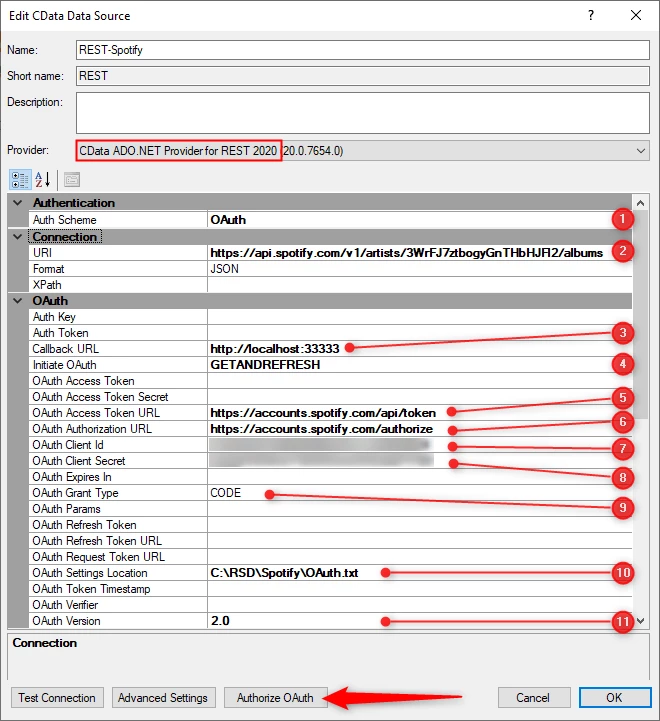
- Outline the steps that correspond to the numbers in the screenshot above. Since these are steps to be completed by the user, use strong action words (e.g. Set/Define/Enter/Select/Click/Drag).
- If there are different options available
- Outline the different options as bullets, give examples of situations when each value would suitable
- State which property value is recommended, and why
Subheading 2
<Outline the second subtopic for the pre-requisites/instructions if necessary>
Heading 2
<Outline the second set of pre-requisites/instructions to guide the user on how to implement the feature/setting>
Subheading 1
<Outline the first subtopic for the pre-requisites/instructions if necessary>
Subheading 2
<Outline the second subtopic for the pre-requisites/instructions if necessary>
Troubleshooting (Optional)
<State common error messages, and state why they occur, and outline steps to solve the issue. Also consider explaining what TimeXtender is doing behind the scenes to make this feature happen, in order to help users self-troubleshoot>
Error - Cannot connect to ODX storage